Reports (/dashboard/reports) is the workspace table-reporting hub. Open ANALYTICS → Reports to browse Favorites, Recent, Standard (built-in), and Custom reports, then run live tables or export files.
Please note:
- Enable the reports module under Enable and manage modules. Navigation appears when you have any of
reports.read,reports.create, or areports.export.*permission.- Standard reports are immutable templates — change fields or filters, then Save As Custom. Never overwrite a Standard report.
- Preview and export need the matching entity permission (for example
reports.export.leads). Without it you may see View only metadata but not the live table.
Hub sections
| Section | What it shows |
|---|---|
| Favorites | Reports you starred (works without edit rights) |
| Recent | Reports you opened recently |
| Standard | Built-in templates seeded for the tenant |
| Custom | Workspace-created or Save As Custom copies |
Each card shows an entity badge (Leads, Deals, People, and so on). Open a report for the live table detail at /dashboard/reports/:id.
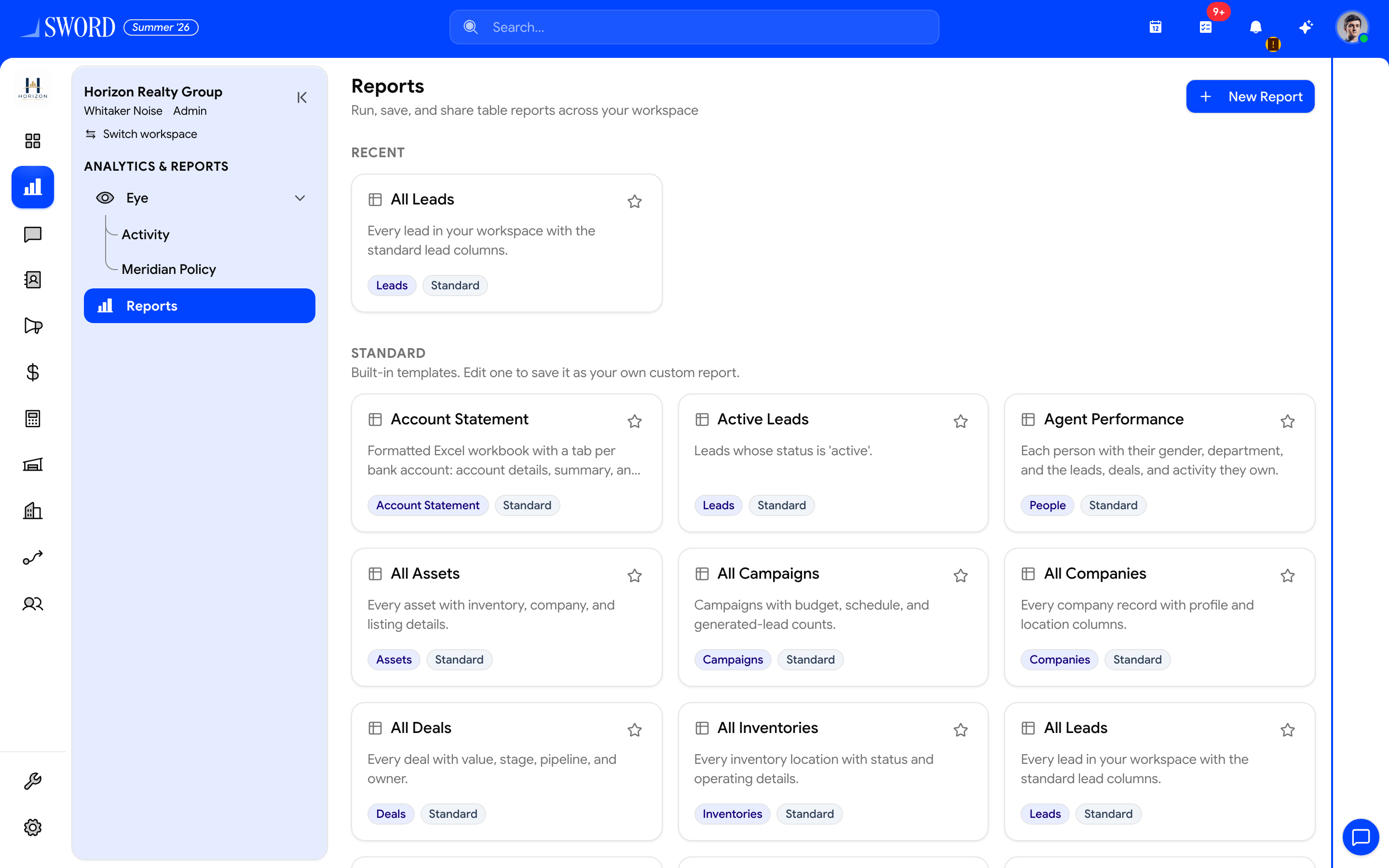
- Open ANALYTICS → Reports
- Create a Custom report with New Report when you have
reports.create - Browse Standard built-in templates (Favorites / Recent / Custom appear when used)
- Open a card for the live table or export-only detail
Run a report
- Open Reports and pick a Standard or Custom report
- Use Fields to choose columns; apply filters and sort
- Browse the paginated preview (100 rows per page where a live table is supported)
- Export as Excel, CSV, or PDF — large jobs show Preparing your export… then Download
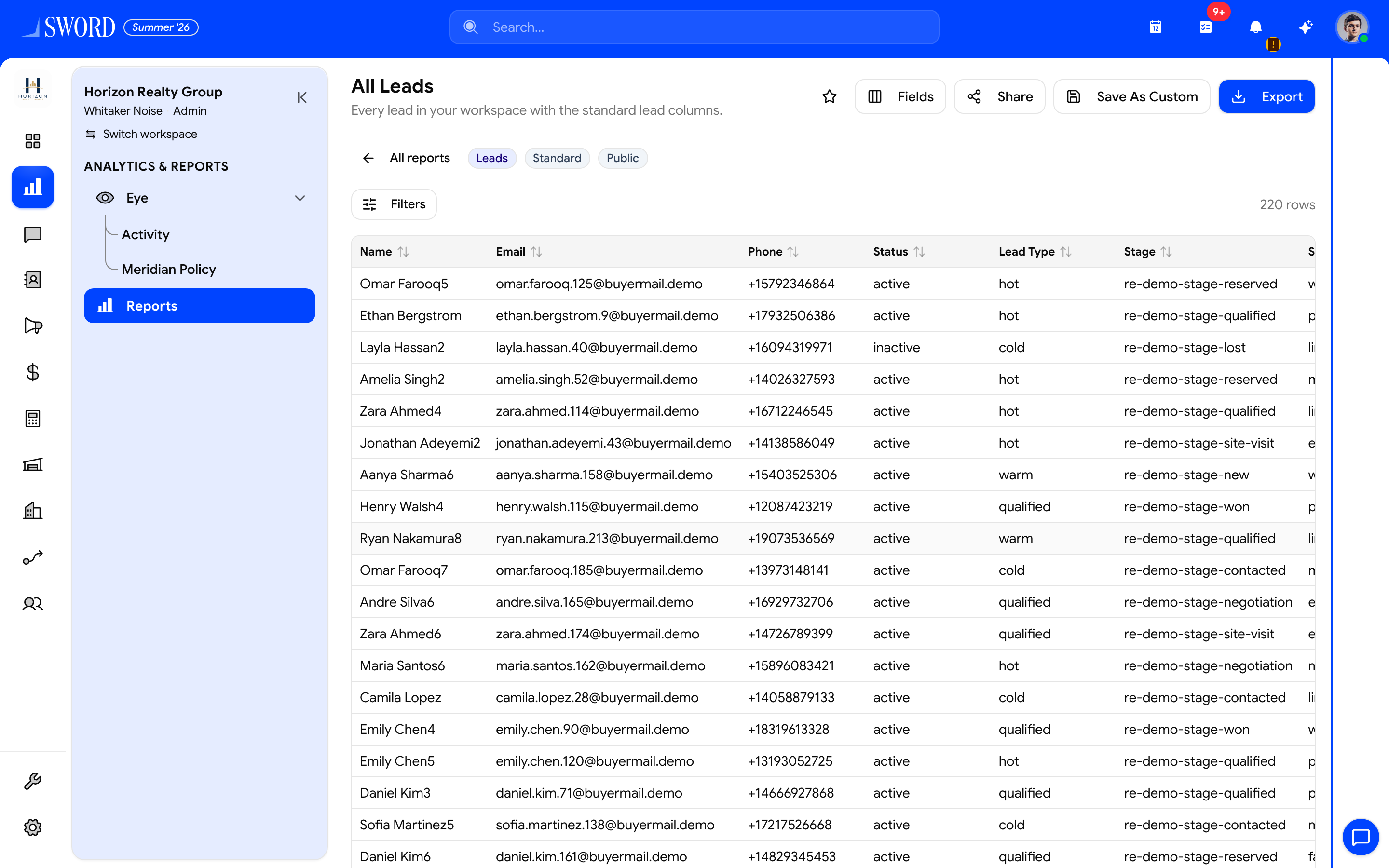
- Fields — choose columns for the preview and export
- Share — private / public / restricted (needs
reports.share) - Export — Excel, CSV, or PDF
- Filters and sort on the live table
- Paginated preview (when the entity supports a live table)
Some entities (for example shifts, FMCG customers, or account statements) are export-only without a live table.
flowchart LR
  Hub[Reports hub] --> Open[Open report]
  Open --> Preview[Live table + filters]
  Preview --> Export{Export size}
  Export -->|Small| Sync[Immediate download]
  Export -->|Large| Async[Queued job then Download]
  Open --> SaveAs[Save As Custom]
Create, save, and share
| Action | Who / permission | Notes |
|---|---|---|
| New Report | reports.create + entity reports.export.* |
Only entities you can export appear |
| Save | reports.update on Custom |
Edits name, fields, filters |
| Save As Custom | reports.create |
Required when starting from Standard |
| Share | reports.share |
Private / Public / Restricted (users, teams, roles) with optional edit access |
| Delete | reports.delete |
Custom only — Standard templates cannot be deleted |
| Star favorite | Any viewer | Stored per user |
Share visibility matches dashboards: Private, Public (everyone), or Restricted with view and optional edit allowlists.
Permissions cheat sheet
| Permission | Purpose |
|---|---|
reports.read |
Open hub and report chrome |
reports.create |
New Report / Save As Custom |
reports.update |
Edit Custom definition |
reports.delete |
Delete Custom |
reports.share |
Change visibility |
reports.export.<entity> |
Preview rows and export that entity |
reports.export / reports.export.all |
Legacy broad export |
Grant create without export only if someone should design reports they cannot run — the UI shows a clear empty state when preview is blocked.
Related
- Read your dashboards and reports — Dashboard widgets vs Reports vs Eye
- FMCG reporting — route and SKU metrics
- Roles in Settings — grant
reports.*on roles - Enable and manage modules — turn on Reports