Deals represent revenue opportunities tied to Companies and contacts. Each deal tracks amount, stage, close date, and owner so forecasts and pipeline reviews reflect reality across your tenant.
Pipeline board
Open Deals to see opportunities grouped by stage. You can:
- Drag cards between stages on the board.
- Open a deal and change Stage on the record.
- Filter by owner, company, or pipeline when multiple pipelines exist.
Stage changes respect deal update permissions on the user's role. Stage labels come from Configure sales pipelines — reps cannot add stages from the board.
Please note:
- Users need Deals read (own or all) and Pipelines read to open the board and see stage columns.
- Moving a card updates the same stage field as editing the record — both require Deals update on the user's role.
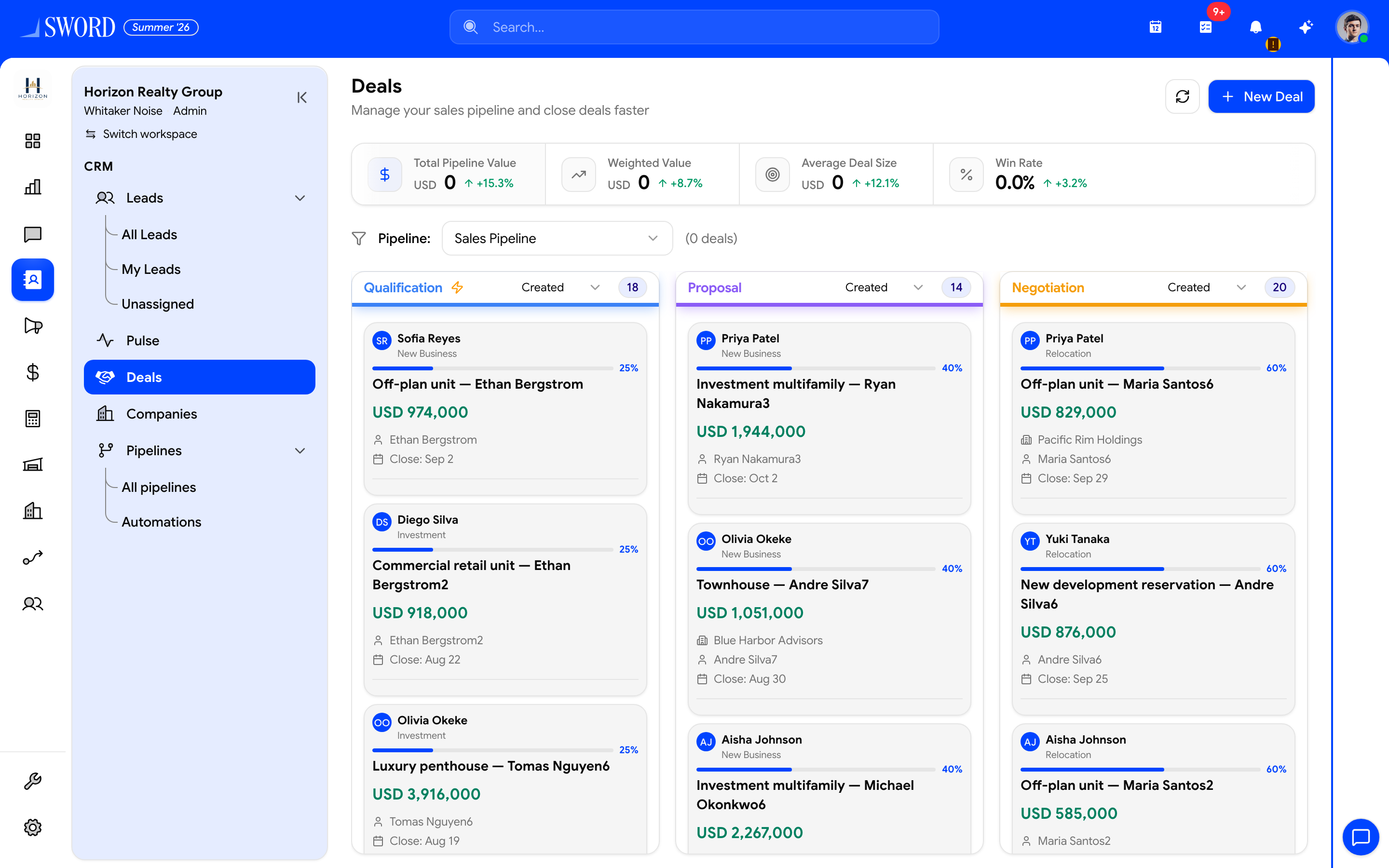
- Open CRM → Deals
- Create with + New Deal
- Pipeline value and win-rate summary cards
- Drag cards between stages on the board
Amounts and close dates
Keep expected value and close date current so dashboards and reports stay trustworthy. Forecast views aggregate open deals by stage and period — stale dates inflate or deflate projections.
| Field | Update when |
|---|---|
| Amount | Scope changes, discounting, or multi-year splits |
| Close date | Customer timeline shifts |
| Stage | Milestone reached (demo done, proposal sent) |
| Probability | Your workspace uses weighted forecasting |
| Owner | Handoff between reps or teams |
Companies and deals
Link deals to Companies for account-level history. One company can have multiple open deals (for example, renewal plus expansion). Activity logged on the deal also surfaces in account context when associations are set.
flowchart TB
  subgraph Pipeline["Deal pipeline"]
    S1[Discovery]
    S2[Proposal]
    S3[Negotiation]
    S4[Closed Won]
  end
  Co[Company] --> D1[Deal A]
  Co --> D2[Deal B]
  D1 --> S2
  D2 --> S1
  S3 --> S4
Deal lifecycle tips
- Create deals from qualified Leads so history carries forward.
- Log Interactions on key calls and emails — managers review timelines, not just stage labels.
- Close lost deals with a reason when your workspace captures loss reasons; reporting improves over time.
- Use Pulse and deal board filters together to find opportunities with no recent activity.
Permissions snapshot
| Role pattern | Typical access |
|---|---|
| Sales rep | Own deals read/update; create from assigned leads |
| Sales manager | All deals read; reassign owners |
| Admin / RevOps | Full access plus Pipelines configuration |
Governance
- Align stage definitions with Configure sales pipelines documentation in your internal playbook.
- Run weekly pipeline scrubs: close date in the past but stage still open usually means the record needs attention.
- Avoid duplicate deals for the same opportunity — merge or link to one company record instead.
Honest stages and dates in Deals feed Reporting, Pulse funnel views, and executive dashboards for the whole tenant.