A hire packet is a saved set of Covenant templates (PDF + signature fields) that new hires receive when they join. Configure it under Covenant → Hire packet (/dashboard/esign/hire-packet). You need esign.send or esign.create (Covenant nav is hidden for signers-only users).
Please note:
- Covenant (
esign) must be enabled — see Covenant e-signatures.- Pair packets with stepped hire onboarding on the invite — Manage members and Add Employee.
- You can also send a packet manually to an existing employee when auto-send is off.
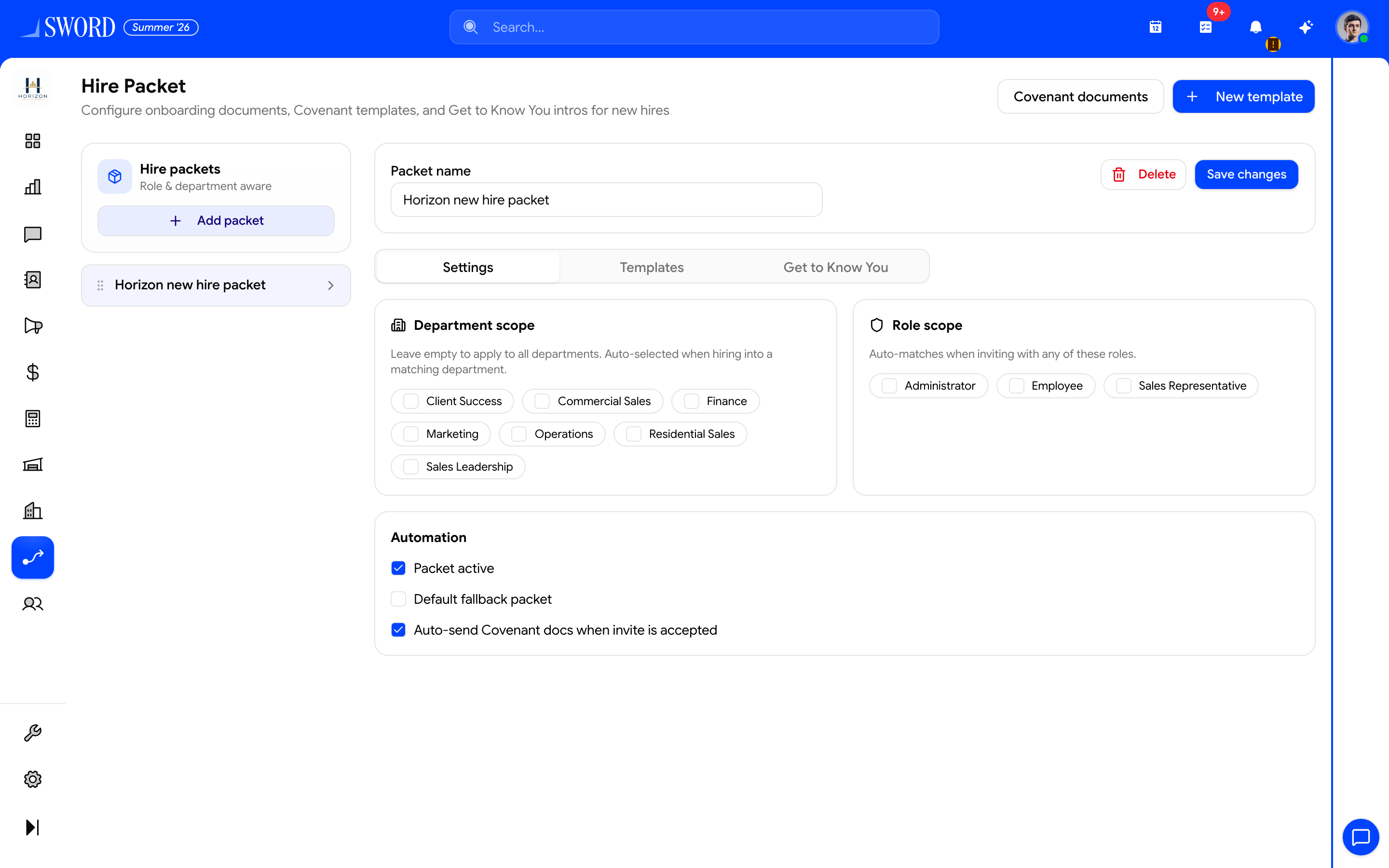
- Add PDF templates with + New template
- Select or create a packet in the left list
- Configure Settings, Templates, and Get to Know You
- Turn on auto-send when invitees accept
Build templates
- Open Covenant → Hire packet
- Choose New template
- Upload a PDF and place signature fields (same field editor as ad-hoc Covenant documents)
- Save the template — it appears in the hire-packet checklist
Configure the packet
| Setting | Purpose |
|---|---|
| Packet name | Label for this workspace’s new-hire set |
| Template checklist | Which templates are included |
| Active | Packet is available to send |
| Auto-send on invite accept | When on, selected templates are sent as the invitee finishes accept |
| Get to Know You | Optional questionnaire on invite accept (custom fields in the GTKY group) |
| Email recipients / threshold | Who gets intro emails when GTKY is completed; high volume collapses to one summary (default threshold 5) |
Save the packet after selecting templates. Keep offer letters, NDAs, and policy acknowledgements as separate templates so you can mix packets later.
Get to Know You
Enable Get to Know You on the packet, define questions (backed by employee custom fields in the Get to Know You group), and choose email recipients (empty department filter = all active members). Completing the questionnaire can:
- Email the team (or a summary when many hires finish at once)
- Surface a Welcome to the team style card on Home for viewers with
home.people_feed
flowchart TD
  Tpl[Create Covenant templates] --> Packet[Select templates in hire packet]
  Packet --> Gtk[Optional Get to Know You]
  Packet --> Invite[Invite or Add Employee]
  Invite --> Accept[Invitee accepts wizard]
  Accept --> Auto{Auto-send on?}
  Auto -->|Yes| Send[Covenant docs emailed for signature]
  Auto -->|No| Manual[HR sends packet later]
  Accept --> GtkDone[GTKY answers + optional intro email]
  Send --> Signed[Completed docs on Covenant + employee files]
New-hire flow end to end
- HR enables onboarding fields and optional hire packet / GTKY on the invite or Add Employee wizard
- Invitee completes welcome → password → field steps → GTKY when enabled
- If auto-send is on, Covenant creates documents from the hire-packet templates and emails signing links
- Signers and senders get in-app notifications (assigned, reminder, completed) in addition to email
- Track status under Covenant → Documents; completed PDFs are previewable/downloadable and can surface on the employee Documents tab and Signed Documents
Manual send
When auto-send is off (or for contractors already in the directory), send the current hire packet to a specific user from the hire-packet / employee Covenant actions. Confirm the employee has a valid email before sending.