The HR module keeps people data alongside the same roles that gate CRM and operations. Workspace admins invite login users through Manage members and assign Roles in settings after profiles are complete.
Please note:
- Linking a login user grants system access governed by Roles, permissions, and RBAC — assign roles after the profile is complete, not before.
- Department and manager fields must be set before leave or shift workflows can route correctly; see Departments and hierarchy.
- Record an accurate exit / termination date when someone leaves — Payroll and tax uses it for final-month proration.
- To limit which sections and fields a role can view or self-edit (and to set an approver), use the role Fields › panels — full guide: Limit employee sections, fields, and self-edit approval.
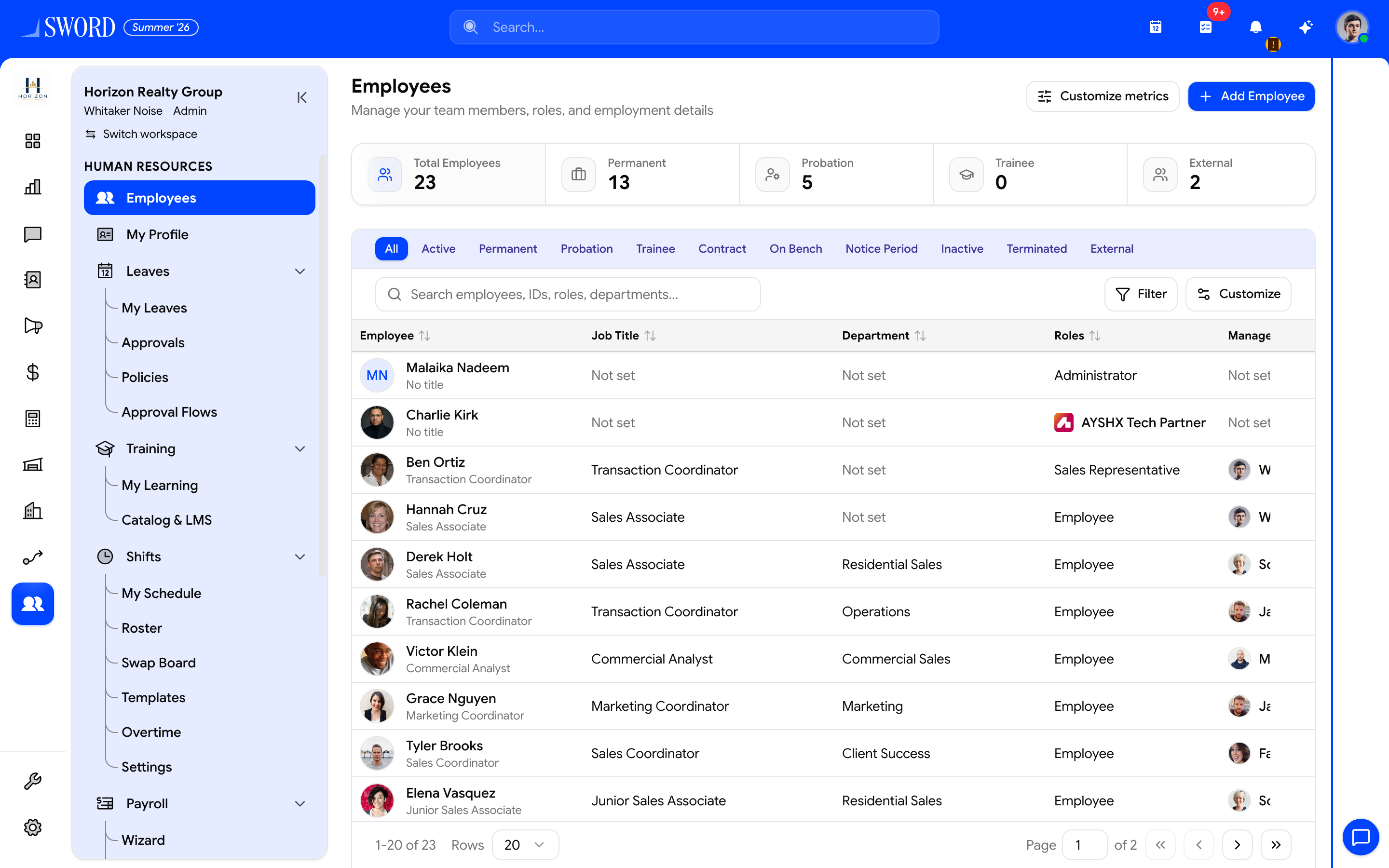
- Open HR → Employees
- Start the hire wizard with + Add Employee
- Glance at headcount metrics (permanent, probation, …)
- Search, filter by status, and open a row for the full profile
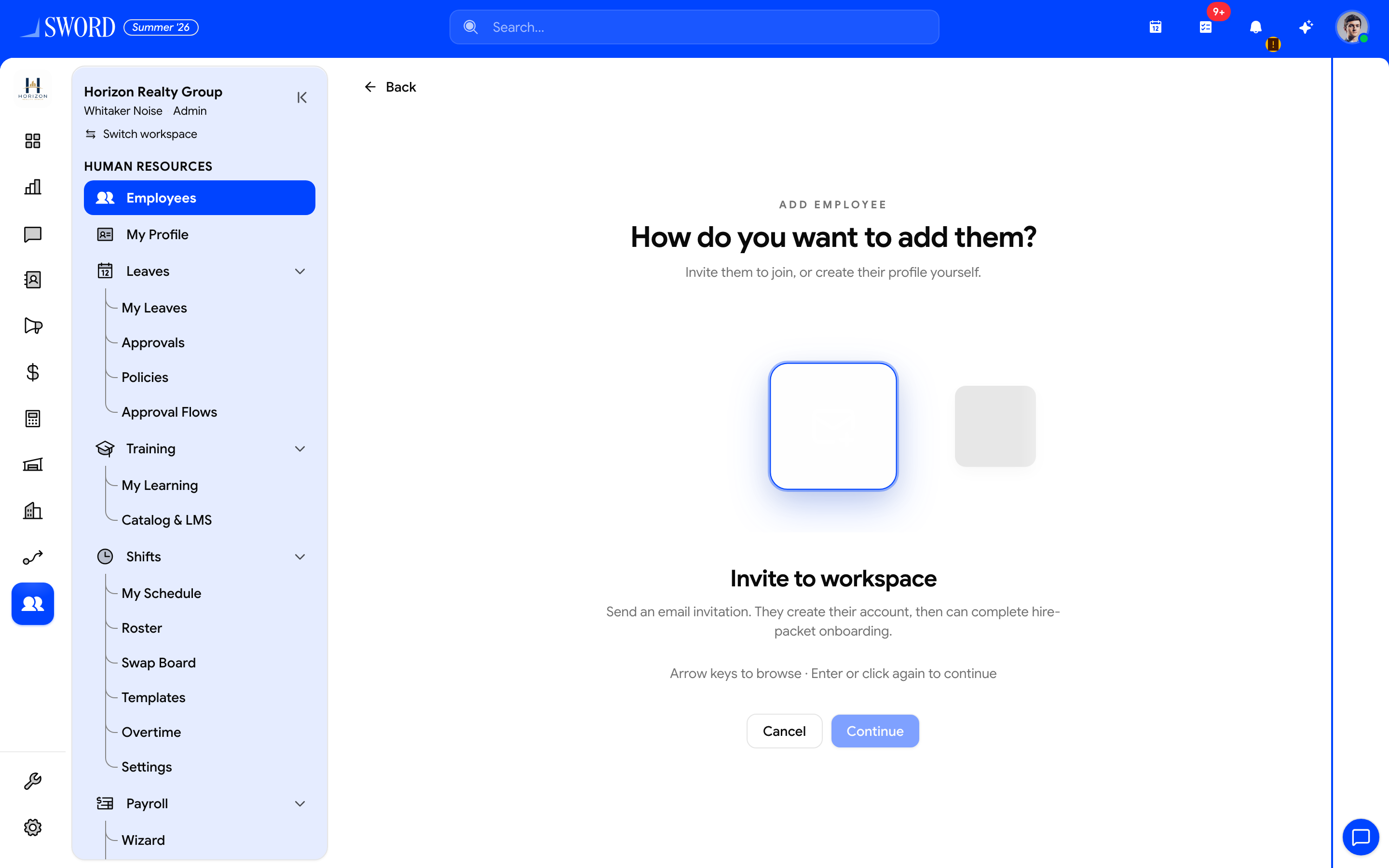
- Invite to workspace — email invite with optional hire-packet onboarding
- Create employee profile — employment record only (link login later)
- Continue into Basics → Role / Team / Packet / Collect → Review
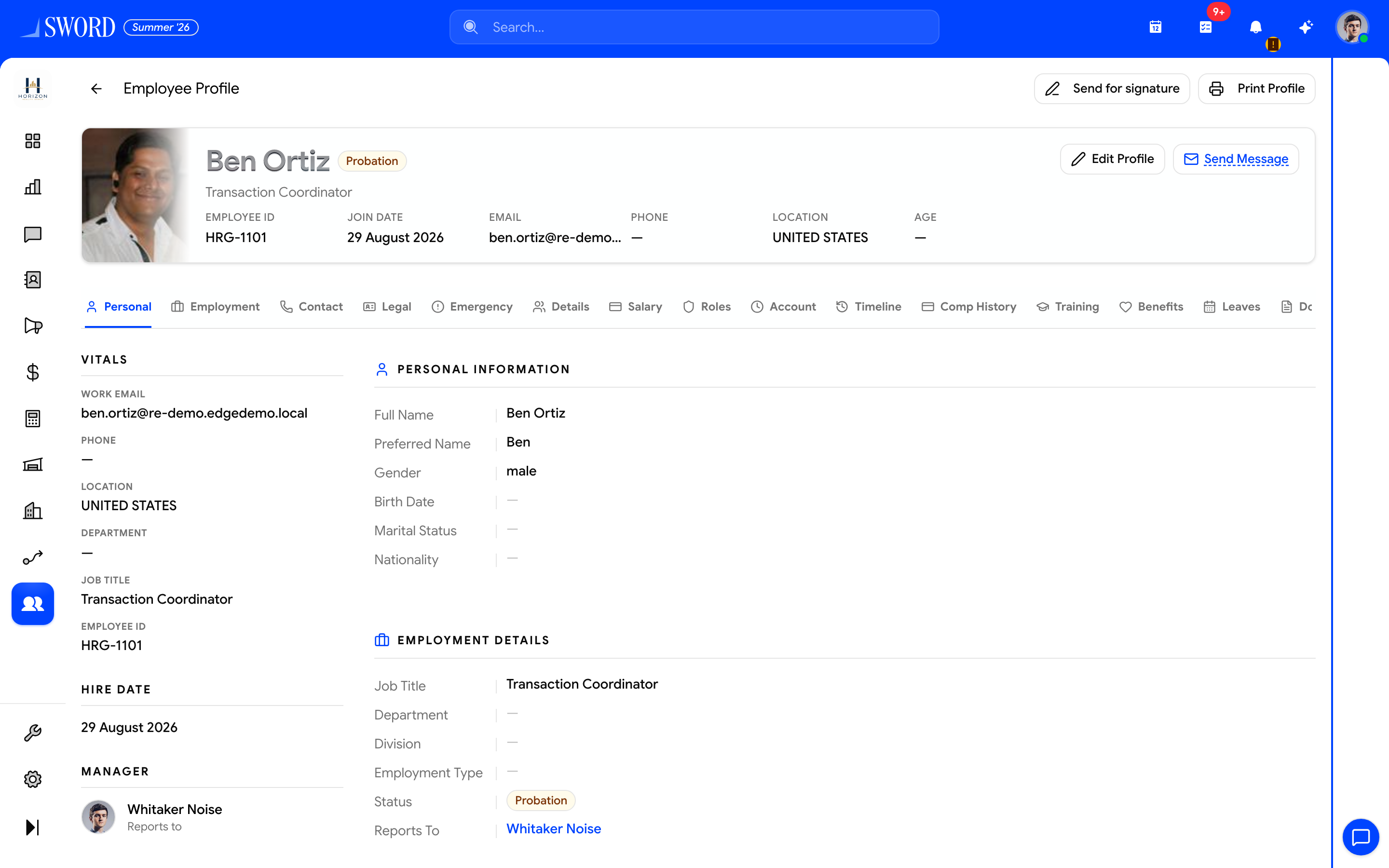
- Photo, title, status, and quick contact facts
- Switch Personal, Employment, Salary, Documents, Leaves, and more
- Edit Profile / Send Message when permitted
- Section cards update with the active tab
Add an employee
Use the full-page Add Employee wizard at /dashboard/hr/employees/add:
| Method | Description | Steps |
|---|---|---|
| Invite to workspace | Email invitation with optional hire-packet onboarding | Basics → Role → Team → Packet → Collect → Review |
| Create employee profile | Employment record only (link a login later) | Basics → Contact → Profile → Job → Bio → Files |
You can also Hire from Recruiting, which creates the user + member, then finish the profile here.
Packet step (invite)
| Control | Purpose |
|---|---|
| Send hire packet on accept | Auto-send Covenant templates when the invitee finishes accept |
| Hire packet select / Auto-match from department & roles | Which packet to use |
| Get to Know You hint | If the packet has GTKY enabled, questions are asked on accept |
Configure templates under Covenant hire packets (Covenant → Hire packet).
Collect step (invite)
Tick which documents / satellites the invitee must provide after creating their password:
| Collect item | Description |
|---|---|
| Profile photo | Clear headshot |
| CNIC / National ID | Front (and back if available) |
| Resume / CV | PDF or DOC |
| Education | School, degree, and dates |
| Bank account | Account for salary deposits |
| Emergency contact | Someone to reach in an emergency |
Directory, columns, and KPIs
On Employees (/dashboard/hr/employees):
| Control | What it does |
|---|---|
| Customize Employee Columns | Personal table layout (browser preference). Only columns your role grants allow appear in the picker — this does not create grants |
| Customize metrics | Administrators only — tenant-wide KPI tiles (metrics, filters, order, icons) |
| Subtitle when reports-only | People who report to you |
Who can see salary columns, contact fields, or whole sections is decided on the role — see Limit employee sections, fields, and self-edit approval.
Profile sections
The employee profile rail includes: Personal · Employment · Contact · Legal · Emergency · Details · Salary · Roles · Account · Timeline · Comp History · Training · Benefits · Leaves · Documents.
| Section | What it holds |
|---|---|
| Personal / Contact / Legal / Emergency | Identity, phones, IDs, emergency contacts |
| Employment | Department, location, manager, employment status, notice/exit dates |
| Details (satellites) | Dependents, education, bank accounts, equipment, client assignments |
| Salary | Current pay structure, allowances, primary bank account |
| Roles / Account | Workspace roles and login account status |
| Timeline | Merged job history and status history |
| Comp History | Compensation changes over time |
| Training / Benefits / Leaves / Documents | Module panels when enabled — hidden for field-restricted viewers |
View and edit access (summary)
| Need | Grant |
|---|---|
| Full or limited company directory | employees.read + optional Employee fields panel |
| Managers see reports only | employees.read_reports + Direct report fields |
| HR edits anyone | employees.update |
| Staff edit My Profile (selected fields) | employees.update_own + Own profile fields |
| Self-edits need review | Same + Require approval (manager / specific user / department) |
Pending self-edits show Profile changes pending approval on the profile and under Approvals hub → Profile updates.
Employment statuses
Statuses include active, permanent, probation, trainee, contract, on bench, notice period, inactive, and terminated. Status and job changes feed the Timeline.
Details (people satellites)
The Details tab aggregates satellite records: emergency contacts, dependents, education, bank accounts (with a primary flag for salary), equipment, and client assignments. Hire Collect steps and Bamboo-style imports write into these same stores.
flowchart TD
  NEW[Add Employee wizard or recruiting] --> PROF[Employee profile]
  PROF --> DEPT[Assign department]
  PROF --> MGR[Set manager in hierarchy]
  PROF --> SAT[Satellites and salary]
  PROF --> TL[Timeline and comp history]
  PROF --> MOD[Training Benefits Documents Covenant]
  Role[Role Fields panels] --> PROF
Departments and hierarchy
Organize teams under Departments and hierarchy so leave approvals, Direct manager self-edit approval, and visibility scopes work correctly. Published Shift scheduling rosters also read department assignments from each profile.
Onboarding, Covenant, and documents
Invites can require Collect steps plus optional Get to Know You on the hire packet. When Covenant is configured, packets auto-send signature PDFs on invite accept — see Covenant e-signatures. Signed and uploaded files appear on the profile Documents tab and the Documents drive (hidden on profile for field-restricted viewers).
Related HR modules
| Module | Doc |
|---|---|
| Field / section access | Limit employee sections, fields, and self-edit approval |
| Recruiting | Recruiting jobs and pipeline |
| Training | Training and TalentLMS |
| Benefits | Benefits plans and enrollments |
| Covenant | Covenant e-signatures |
| Documents | Documents drive |
| Provident fund | Provident fund and EOBI |
| HR catalogs | HR catalogs |
| Data migration | Data migration |
| Payroll | Payroll and tax |
| Approvals | Approvals hub |