Covenant collects electronic signatures on PDFs and wraps them in cryptographic evidence: content fingerprints, a tamper-evident audit chain, a Certificate of Authenticity, and (when enabled) independent timestamps on the Bitcoin blockchain via OpenTimestamps. This article explains how that works, how to verify a signed file, how Covenant maps to U.S. electronic-signature law, and practical use cases.
Please note:
- This is a product and cryptography guide — not legal advice. Enforceability depends on your document type, parties, industry rules, and counsel’s review.
- Covenant implements electronic signatures with strong integrity evidence. It does not issue X.509 / PKI “digital certificates” per signer (see Electronic vs digital signatures below).
- For day-to-day sending and hire packets, start with Covenant e-signatures and Covenant hire packets.
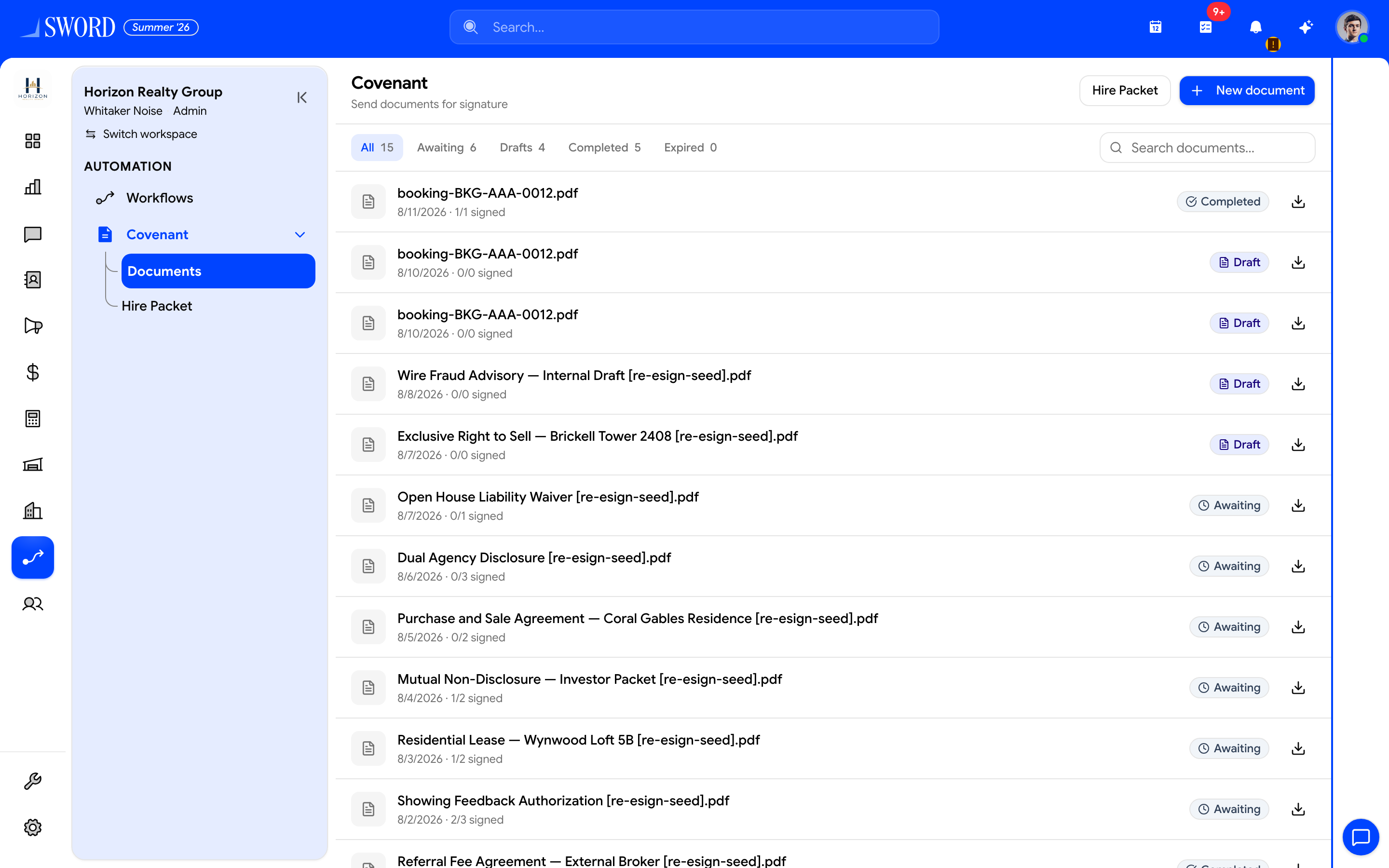
- Filter Completed to find finalized packets
- Open a row for the Certificate of Authenticity and audit trail
- Download the signed PDF to verify hashes externally when needed
Why cryptography matters for e-sign
A wet-ink signature on paper is hard to alter without leaving marks. A PDF is trivial to edit unless you can prove:
- What was signed (bytes of the document)
- Who consented and signed, and in what order
- When those events happened (and that the log was not rewritten later)
Covenant answers those with SHA-256 hashes, a hash-chained audit log, optional Bitcoin anchors, and a public verification page that never exposes private document contents.
flowchart TB
  Upload[Upload original PDF] --> H1[SHA-256 originalHash]
  H1 --> Sign[Consent + draw signatures]
  Sign --> Audit[Hash-chained audit events]
  Audit --> Final[Burn signatures into PDF + Certificate page]
  Final --> H2[SHA-256 finalizedHash]
  Audit --> Root[Freeze auditChainRootHash]
  H1 --> OTS[OpenTimestamps to Bitcoin]
  H2 --> OTS
  Root --> OTS
  H2 --> Verify[Public / owner verify]
  Root --> Verify
Electronic vs digital signatures
| Term | What it usually means | What Covenant does |
|---|---|---|
| Electronic signature | Any electronic sound, symbol, or process attached to a record with intent to sign (U.S. ESIGN / UETA definition) | Drawn signature image + explicit consent + association to the PDF via the signing workflow and audit trail |
| Digital signature (PKI) | Cryptographic signature with a private key and X.509 certificate (often CMS/PAdES) | Not used — Covenant does not issue per-signer digital certificates |
| Integrity / tamper evidence | Prove the file and log were not altered | SHA-256 of original and finalized PDFs + hash-chained audit + optional OpenTimestamps |
Covenant is closer to a simple electronic signature (SES) enhanced with advanced integrity and timestamp evidence, not a qualified certificate (QES) under eIDAS. That is still a valid signature medium for most U.S. commercial and HR agreements when process requirements (intent, consent, association, retention) are met.
Cryptographic building blocks
SHA-256 document fingerprints
When a PDF is uploaded, Covenant downloads the stored bytes and computes:
originalHash = SHA-256(original PDF bytes) → stored as a 64-character hex digest.
After every required party has signed, Covenant:
- Appends a final audit event (“Document completed — all signatures collected”)
- Freezes
auditChainRootHashto the last event’s hash - Embeds each signature PNG, signer name, and signed time into the PDF
- Appends a Certificate of Authenticity page (with a QR code to the public verify URL)
- Computes
finalizedHash = SHA-256(final PDF bytes)and stores the completed file
Anyone who later changes even one byte of the PDF produces a different SHA-256. Verification is a simple, independent comparison: re-hash your copy and match it to the recorded digest.
Hash-chained audit log
Every meaningful step is an audit event with a sequence number. Each event’s eventHash is:
SHA-256( previousEventHash + canonicalJSON(event fields) )
Fields in the chain include document id, sequence, activity text, IP address, user agent, details (for example signer name/email or routing order), and timestamp. The first event links from a fixed genesis hash (64 zero hex characters).
That design means:
- Inserting, deleting, or editing an old event breaks every later hash
- The frozen
auditChainRootHashis a single fingerprint of the entire signing history - Owners can re-walk the chain on the document Integrity card (“Integrity verified — hashes and audit chain are intact”)
Typical chained activities include: document uploaded → signers added → fields placed → legal consent given → each signer signed → reminders → document completed.
What is (and is not) hashed separately
| Artifact | Integrity coverage |
|---|---|
| Original PDF bytes | originalHash |
| Final PDF (signatures burned in + certificate page) | finalizedHash |
| Audit history | Per-event chain → auditChainRootHash |
| Individual signature PNG files | Covered inside the finalized PDF hash after burn-in (not a separate per-image digest) |
| Signer access tokens | Random secrets for the signing link — not content hashes |
Optional Bitcoin anchoring (OpenTimestamps)
When ESIGN_OTS_ENABLED is on for the deployment, Covenant submits digests to OpenTimestamps calendars. Those proofs are later upgraded until they land in a Bitcoin block.
| Anchor purpose | Hash stamped | When |
|---|---|---|
| Original document | originalHash |
At upload |
| Signed document | finalizedHash |
At completion |
| Audit trail | auditChainRootHash |
At completion |
UI statuses:
| Status | Meaning |
|---|---|
| Queued | Stamp job not finished yet |
| Awaiting Bitcoin confirmation | Calendar proof exists; waiting for Bitcoin attestation |
| Confirmed on Bitcoin | Proof verified against a Bitcoin block (block height/time recorded) |
| Failed | Stamping could not complete |
Anchoring is best-effort and asynchronous. Documents can still complete if OTS is off or calendars fail; Bitcoin confirmation often takes a few hours. The value of a confirmed stamp is independent, widely audited time evidence that the hash existed by that block — without trusting only EDGE’s servers.
The signing ceremony (how intent is captured)
Cryptography alone does not make a signature; process does. Covenant’s flow maps to the usual U.S. pillars (intent, consent to electronic process, association with the record, retention):
- Invite — signer receives a unique link (
accessToken, typically valid 7 days); signing is sequential by routing order - Consent — signer accepts Electronic Signature Consent (“I Agree — Continue to Sign”); Covenant logs
Legal consent givenwith name, email, IP, and user agent - Sign — signer draws on a canvas; PNG stored and associated to fields on the PDF; audit logs
Signer {name} signedwith routing order and IP - Complete — last signer triggers finalization, certificate page, hashes, and optional OTS stamps
- Retain — completed PDF + audit + verification id remain available to authorized users; public verify exposes hashes only, not the file contents or signer PII
Reminders are rate-limited (for example a small number per rolling day, with a minimum gap) so the audit trail of “Reminder sent” stays meaningful.
How to verify signatures and integrity
A. Public verification (anyone with the link)
From the Certificate of Authenticity QR code or URL (/verify/esign/{verificationId}?t={tenantId}):
- Open the page — you see recorded SHA-256 values, whether the audit chain is valid, and blockchain timestamp statuses for original / signed / audit trail
- Under Verify your copy, upload your PDF (max 20MB)
- Covenant re-hashes your file and reports:
- Match — this file is the signed document (matches
finalizedHash), or - Match — this file is the original document (matches
originalHash), or - No match — this file differs from the recorded document
- Match — this file is the signed document (matches
- If an OpenTimestamps proof is Confirmed on Bitcoin, the server can also check that the proof verifies for the matched purpose
The public page is deliberately privacy-preserving: it does not reveal filenames, document contents, or signer identities. Verification traffic is rate-limited per IP.
B. Owner / workspace verification
On Covenant → Documents → View:
- Open the completed document
- Use the Integrity controls to re-download stored objects, recompute SHA-256, and re-walk the audit chain
- Confirm toast/status such as Integrity verified — hashes and audit chain are intact
- Review per-event audit history and reminder history
- Download the finalized PDF and optionally re-check it on the public verify page
C. Independent offline check (advanced)
Anyone can compute SHA-256 of a local PDF with standard tools (shasum -a 256 file.pdf, OpenSSL, etc.) and compare to the digests shown on the verify page. For confirmed OTS proofs, OpenTimestamps tooling can validate the .ots proof against Bitcoin without using EDGE’s UI — the product stores proofs under the document’s anchor objects when stamping succeeded.
What a successful verify proves
| Claim | Supported by |
|---|---|
| “This PDF is byte-identical to the completed Covenant file” | finalizedHash match |
| “This PDF is the pre-signature original” | originalHash match |
| “The signing history was not rewritten after the fact” | Valid hash chain + matching frozen root |
| “These hashes existed by a certain Bitcoin time” | Confirmed OpenTimestamps anchors |
| “Alice intended to sign under applicable e-sign rules” | Consent + signature ceremony + audit (legal conclusion still for counsel) |
A hash match does not by itself prove the signer’s real-world identity beyond the email/contact and process your organization used — treat KYC / HR identity proofing as a separate control when risk requires it.
Legal framework: when is an electronic signature “valid”?
United States (federal + states)
Covenant’s Certificate of Authenticity states that electronic signatures on the platform are intended to be legally binding to the same extent as handwritten signatures under applicable electronic signature laws, including the U.S. ESIGN Act and UETA, where applicable, and that the certificate attests to integrity and signing events only — it does not constitute legal advice.
In plain language:
| Layer | What it does |
|---|---|
| ESIGN Act (2000) | Federal law: a signature or contract cannot be denied legal effect solely because it is electronic, for transactions in or affecting interstate/foreign commerce |
| UETA | Uniform state law adopted widely across U.S. jurisdictions (most states, D.C., and several territories) with the same core idea for many in-state transactions |
| New York | Uses its own Electronic Signatures and Records Act (ESRA) rather than UETA, with the same practical effect that electronic signatures can be valid |
| Net result | Across the United States, electronic signatures are generally recognized as a valid signature medium for most commercial and employment agreements when statutory requirements are met |
ESIGN / UETA are technology-neutral: they do not require Bitcoin or SHA-256. Covenant’s cryptography strengthens evidence (integrity, auditability, independent time), which is what courts and auditors often care about when a signature is challenged.
Common statutory pillars Covenant’s product flow supports:
- Intent to sign — consent screen + deliberate draw-to-sign
- Consent to electronic process — explicit agreement before signing
- Association with the record — signatures burned into the PDF; audit links person ↔ document ↔ time
- Retention / reproduction — downloadable finalized PDF + verification record
Typical exclusions and industry overlays
Even where ESIGN/UETA apply, some records still require wet ink or special form (examples often include certain wills/testamentary documents, some family-law instruments, and selected UCC / real-property formalities depending on jurisdiction). Regulated industries may add rules (for example FDA 21 CFR Part 11, specific banking or government filing channels). Always confirm with counsel before relying on e-sign for high-risk instruments.
Outside the United States
Many countries recognize electronic signatures, but tiers differ (for example EU eIDAS: SES / AES / QES). Covenant’s model is best described as an electronic signature with cryptographic integrity evidence — not a qualified certificate. For cross-border packets, have local counsel confirm whether SES-class e-sign plus hash/timestamp evidence meets your use case, or whether a local QES provider is required.
Use cases and examples
HR and people ops
| Use case | Example | Why Covenant fits |
|---|---|---|
| Offer / hire packet | NDA, handbook ack, offer letter via hire packets | Auto-send on invite accept; audit for onboarding compliance |
| Policy acknowledgement | Remote-work or code-of-conduct PDF | Fast sequential signing; retain finalized hash |
| Contractor agreement | MSA short-form with vendor contact | Public verify link for both parties’ counsel |
Example: Acme enables hire-packet auto-send. When Sara accepts her invite, she completes onboarding fields, then receives Covenant links for Offer.pdf and NDA.pdf. After she signs, Acme’s HR downloads the finalized PDFs; six months later, Legal uploads Offer.pdf to the public verify URL and sees Match — signed document with Confirmed on Bitcoin on the signed-document and audit-trail anchors.
Sales and commercial
| Use case | Example |
|---|---|
| Order form / SOW | Customer countersigns pricing PDF |
| Channel partner terms | Two routing-order signers (partner, then Acme) |
| Amendment | Short PDF amendment with dual signature blocks |
Example: Two signers, routing order 1 then 2. Partner signs Monday; Acme signs Tuesday. The audit chain shows consent and sign events with IPs; the finalized hash is stamped. If someone emails a “signed” PDF that was re-exported from Word, verify upload returns No match.
Operations and vendors
| Use case | Example |
|---|---|
| Vendor onboarding | W-9 acknowledgement packet (where e-sign is allowed) |
| Facilities / safety | Site induction acknowledgement |
What not to use Covenant for (without counsel)
- Documents your counsel flags as wet-ink only in your jurisdiction
- Processes that legally require a specific qualified certificate or government eID
- Situations needing cryptographic proof of a government-issued personal identity (Covenant proves process + integrity, not national ID)
Certificate of Authenticity (what the last page means)
The final PDF’s last page is generated at completion. It typically includes:
- Cryptographic Assurance tiles: SHA-256 hashing, hash-chained audit, OpenTimestamps, public verification
- Document integrity digests
- Scan to verify QR → public verify URL with tenant context
- Legal Notice summarizing intended binding effect under ESIGN/UETA where applicable, and that the certificate is not legal advice
- Footer badges such as SHA-256 / Hash Chain / OpenTimestamps / Verified
Treat the certificate as evidence packaging, not a court opinion.
Security and trust properties (summary)
| Property | Mechanism |
|---|---|
| Confidentiality of public verify | Hashes and statuses only — no file contents or signer list |
| Integrity of PDF | SHA-256 original + finalized |
| Integrity of history | Hash-chained audit with frozen root |
| Independent time | OpenTimestamps → Bitcoin (when enabled and confirmed) |
| Signing link safety | Unguessable token, expiry, sequential routing |
| Abuse resistance | Reminder limits; public verify rate limits |
Related
- Covenant e-signatures — create, send, download
- Covenant hire packets — new-hire templates
- Documents drive — where completed files may also live
- Manage employees and profiles — HR context for onboarding signatures