Pulse is EDGE Sword's sales health dashboard. It surfaces leads that need attention before they go cold, so reps and managers can act on follow-ups instead of guessing from static lists.
Who can use Pulse
Pulse respects your tenant's roles and permissions. Users need Pulse view (or admin) access to open the module. Lead data shown in Pulse follows the same Leads read rules as the rest of CRM — owners see their book; managers with broader permissions see team-wide results.
Please note:
- Pulse view alone is not enough — users also need Leads read (own or all) to see records in staleness buckets.
- Staleness depends on logged interactions; calls without a timeline entry still count as untouched.
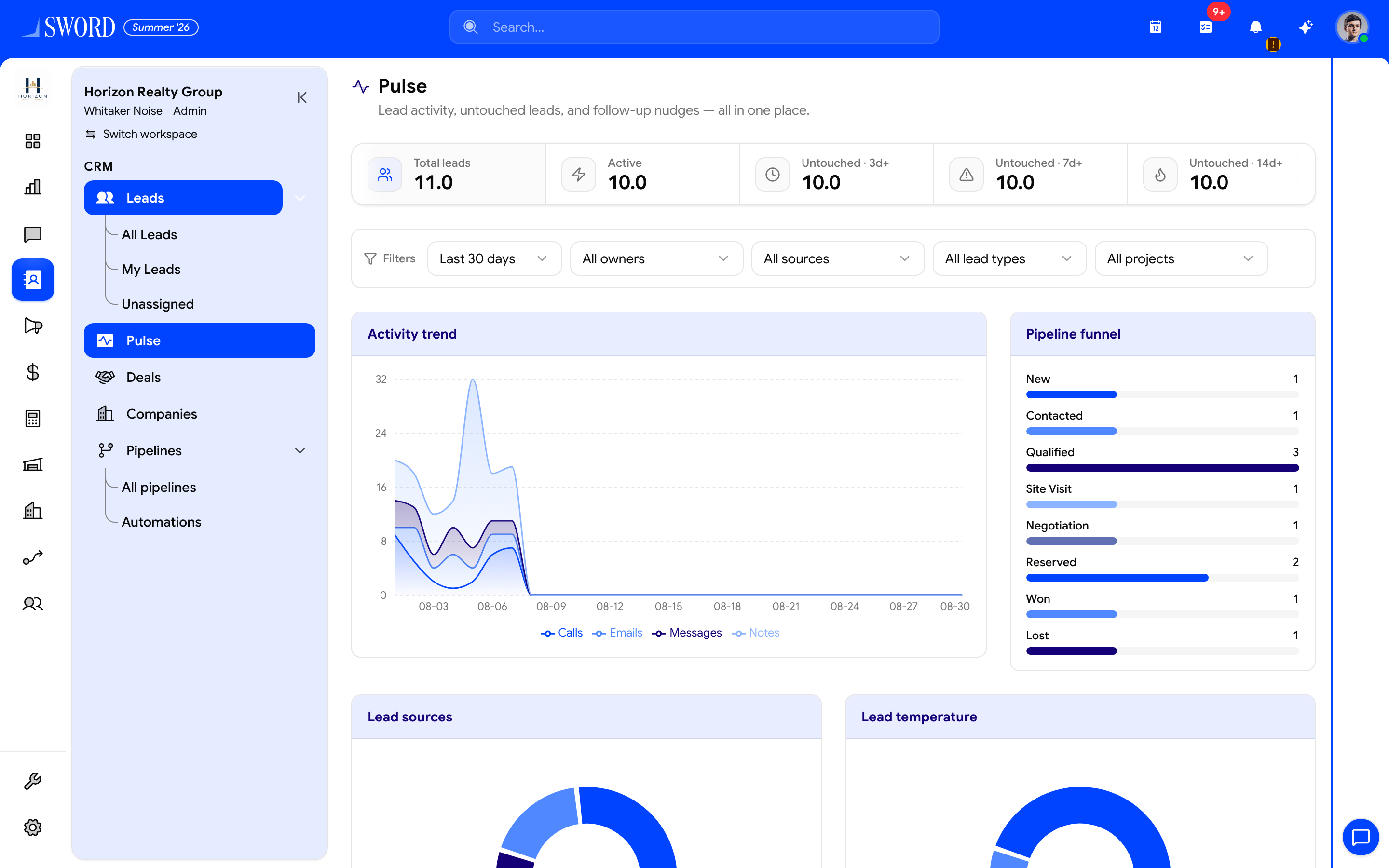
- Open CRM → Pulse
- Untouched 3d+ / 7d+ / 14d+ buckets prioritize outreach
- Filter by timeframe, owner, source, type, or project
- Activity trend (calls, emails, messages, notes)
- Pipeline funnel stages for the selected segment
Open Pulse and filter your view
- Open Pulse from the Sales group in the sidebar.
- Set the date range (for example, last 7 or 30 days).
- Optionally filter by owner, source, lead type, or project to focus on a segment.
The dashboard combines KPI widgets, activity trends, source breakdown, funnel stages, and an untouched-leads board so you can move from insight to action in one place.
Staleness buckets
Pulse groups leads by how long it has been since their last logged interaction (call, email, message, or note). Funnel stage widgets also reflect pipeline configuration — keep stages current so bucket and stage views agree. Use these buckets to prioritize daily outreach.
| Bucket | Days since last activity | Suggested action |
|---|---|---|
| Fresh | 0–2 | Monitor; no urgent follow-up needed |
| Warming | 3–6 | Schedule a touchpoint this week |
| Stale | 7–13 | Call or email today; update stage if unqualified |
| Cold | 14+ | Re-engage, reassign, or mark lost with a reason |
Daily follow-up workflow
- Review Untouched leads and sort by staleness or owner.
- Open a lead from the board and log the interaction on the record timeline.
- Move the lead stage or convert to a Deal when qualified.
- Check Recent activity to confirm the team is keeping pace — compare with field activity logged through the Salesmen portal.
flowchart LR
  A[Open Pulse] --> B[Apply filters]
  B --> C{Lead bucket}
  C -->|Fresh| D[Monitor]
  C -->|Warming| E[Schedule follow-up]
  C -->|Stale / Cold| F[Contact lead]
  F --> G[Log interaction]
  G --> H[Update stage or convert]
  H --> I[Refresh Pulse metrics]
Manager tips
- Compare Owner leaderboard and Activity trend in weekly pipeline reviews.
- Pair Pulse with saved lead views for reps who prefer list-based work.
- If cold leads pile up, revisit assignment rules or enable automation reminders in Workflows.
- Review Source breakdown against Build forms and campaign attribution when inbound volume shifts.
Pulse reads the same lead and activity data as Leads and Interactions — consistent logging keeps the dashboard trustworthy for the whole tenant.